Software Engineering: A Modern Approach
1 AI-Assisted Software Engineering 🔗
The hottest new programming language is English. — Andrej Karpathy (post on X, January 24, 2023)
This chapter explores how artificial intelligence can support software engineering activities. We begin with coding assistants, tools that suggest code in IDEs (Section 10.2). We then turn to a more sophisticated form of automation: coding agents, which can autonomously plan tasks, call external tools, edit files, and iteratively validate their changes (Section 10.3). Section 10.4 then discusses how AI applications integrate with external systems through protocols such as MCP (Model Context Protocol) or command-line tools. Finally, Section 10.5 addresses a central aspect of using language models: writing clear and effective prompts, particularly for software engineering tasks.
1.1 Introduction 🔗
For more than two decades, researchers have investigated the use of Artificial Intelligence to automate software engineering tasks. This research has addressed tasks such as:
- Code generation and completion
- Code comprehension
- Bug localization and fixing
- Bug prediction
- Change impact analysis
- Test case generation
- Test selection and prioritization
- Refactoring recommendations
- Identification of design and architectural problems
- Architectural remodularization
- Microservices extraction
- Identification and prioritization of technical debt
- Automated library updates
- Reengineering and modernization of legacy systems
- Programming language migration
- Prioritization of maintenance tasks
- Documentation generation
- Code reviewer recommendation
- Automated code review
- Security vulnerability detection
- Software effort estimation
- Requirements classification and prioritization
In 2016, Abram Hindle, Earl Barr, Mark Gabel, Zhendong Su, and Prem Devanbu published an influential paper titled On the Naturalness of Software (link). Using statistical modeling techniques, the authors provided evidence supporting the following hypothesis in the context of software:
Naturalprograms, the ones that real people actually write, are mostly simple and rather repetitive; thus they have usefully predictable statistical properties that can be captured in statistical language models and leveraged for software engineering tasks.
The authors thus demonstrated the feasibility of building statistical language models and successfully applying them to software development. They also developed a prototype of a simple code completion tool that outperformed a widely used tool at the time.
Two years later, OpenAI began releasing its first language models: GPT-1 (2018), GPT-2 (2019), and GPT-3 (2020). In November 2022, the company launched ChatGPT, which quickly gained popularity, reaching 100 million users in just two months. By comparison, Instagram took two and a half years to reach the same milestone.
In June 2022, a few months before ChatGPT’s release, GitHub made GitHub Copilot generally available, demonstrating that the software industry had already recognized the potential of language models for software development. We will discuss coding assistants, including the original version of GitHub Copilot, in more detail in Section 10.2.
In a 2023 paper, Shunyu Yao and colleagues proposed ReAct (Reasoning + Acting), an approach that introduced a new paradigm for using LLMs through an iterative cycle of reasoning and action (link). Rather than simply producing a final answer, a model following ReAct reasons about its next steps, takes actions (such as invoking external tools), and uses the results to guide subsequent steps. This approach enabled LLMs to tackle longer and more complex tasks and helped inspire the architecture of modern AI agents. We will discuss these agents in Section 10.3.
Section 10.4 examines the integration of AI applications with external systems through protocols such as MCP (Model Context Protocol). Section 10.5 presents recommendations for writing more effective prompts and, consequently, improving the quality of the results produced by AI models.
Note: AI is advancing at a remarkable pace. For this reason, this chapter focuses on concepts and techniques that we consider sufficiently established to remain relevant over time. We avoid discussing technologies that are still experimental, as well as naming specific systems and models whenever possible. After all, many solutions that attracted considerable attention just two or three years ago have already become obsolete or lost relevance. Although keeping pace with these advances is challenging, we hope that most of the concepts presented in this chapter will remain useful for years to come, making it a worthwhile read.
1.2 Coding Assistants 🔗
The best-known example is GitHub Copilot, launched in 2022 by GitHub in partnership with OpenAI. Its first version was designed to assist developers, much like a partner in a pair programming session; hence the term AI pair programming. In practice, these assistants integrate with IDEs and suggest code completions as developers write code.
Suppose you have started implementing a sorting method and have written its signature:
public void selectionSort(int[] arr) {At this point, a coding assistant may recognize the new method and suggest its implementation:
  for (int i = 0; i < arr.length - 1; i++) {
    int minIndex = i;
    for (int j = i + 1; j < arr.length; j++) {
      if (arr[j] < arr[minIndex]) {
         minIndex = j;
      }
    }
    int temp = arr[i];
    arr[i] = arr[minIndex];
    arr[minIndex] = temp;
  }
}
The developer must review the suggested code before accepting it. If the suggestion is unsuitable, the developer can simply continue writing the code manually.
A coding assistant is relatively straightforward to implement. It continuously monitors the code being written and sends prompts to an LLM to suggest completions. In the previous example, after the first line of the method has been written, the assistant might submit the following prompt to the underlying LLM:
You are a coding assistant. Continue this Java function:

public void selectionSort(int[] arr) {
In practice, coding assistants use more detailed prompts, which may include the lines preceding and following the current cursor position in the IDE, nearby comments, and libraries imported at the beginning of the file.
With AI pair programming, the developer remains in control, reviewing and accepting the code suggested by the assistant. However, the assistant does not have the autonomy to work independently on multiple parts of the codebase.
Since its initial release, GitHub Copilot has gained new capabilities, including a chat interface for submitting tasks and an agent-based version. We will discuss this latter approach in the next section.
1.3 Coding Agents 🔗
A coding agent is characterized by its autonomy. It receives a task (for example, performing a refactoring) and can invoke tools or scripts on the user’s machine to accomplish it. These tools may read and modify files, run tests, create commits, open pull requests, and perform other development activities. This section first explains the capabilities and architecture of coding agents, then discusses how to configure them to follow project-specific rules.
1.3.1 Architecture 🔗
Typically, we interact with LLMs by submitting a prompt describing a task, and the model processes it and returns a result. A coding agent, however, has a more sophisticated architecture, built around an iterative loop, as illustrated in the following figure.

As with traditional LLM interactions, the user submits a prompt asking the agent to perform a task. However, the agent does not need to complete the task in a single step. Instead, the model can request the execution of a tool and then analyze its output. This loop (model → tool → model → …) can repeat several times until the model decides that the task is complete and produces a final response. At that point, the loop ends.
In coding agents, this loop is called the agentic loop. Another important term is agentic harness, which refers to the software infrastructure surrounding the language model. Thus, the agentic loop, the mechanism for invoking tools, and even the agent’s user interface are all part of its harness.
Architecturally, a coding agent consists of two main components: the harness and the language model, which is typically accessed through an API. The harness contains all the code responsible for what happens before and after each model call, as illustrated in the following figure.

This relationship can be expressed as follows:
Agent = Harness + Language Model
Harness = Agentic Loop + UI + Security Controls + etc.
The harness is responsible for invoking tools that typically run on the developer’s machine. These tools can be grouped into four main categories:
File operations (reading, editing, creating files, etc.).
File search (listing files whose names match a pattern, searching file contents using regular expressions, etc.).
Shell command execution (starting servers, running tests, executing Git commands, etc.).
Web access (searching the web, accessing documentation, looking up error messages, etc.).
Example: Consider a refactoring task that replaces
uses of the Vector type with ArrayList in a
Java system. Even this relatively simple task may require seven
iterations of the agentic loop, as illustrated below:
Iteration 1:
- Model: requests a search for files containing
Vector. - Harness: executes the search and sends the results to the model.
Iteration 2:
- Model: requests the contents of the relevant files.
- Harness: reads the files and sends their contents to the model.
Iteration 3:
- Model: identifies where
Vectoris used as a type and requests its replacement withArrayList. - Harness: executes the edits and sends the results to the model.
Iteration 4:
- Model: requests that the tests be run.
- Harness: runs the tests and sends the results to the model.
Iteration 5:
- Model: analyzes the failing tests and requests the necessary fixes.
- Harness: applies the fixes, reruns the tests, and sends the results to the model.
Iteration 6:
- Model: after confirming that the tests pass, requests the creation of a commit and a pull request (PR).
- Harness: creates the commit, opens the PR, and sends the results to the model.
Iteration 7:
- Model: returns a final response summarizing the completed task.
A trajectory is the complete record of an agent’s execution of a task. It includes the model’s actions, the tools invoked, and their results.
1.3.2 Memory and System Prompt 🔗
One important feature of an agentic loop is that it is stateful: each iteration takes into account the conversation history up to that point. In practice, with each call to the model, the harness sends not only the most recent result but also the relevant history of previous tool executions and model responses (possibly compressed or summarized to save tokens). This history, also called the agent’s memory, allows the model to track what has already been done, analyze the results, and decide which tool to invoke next.
An agent also has a system prompt, which the harness sends to the model. This prompt defines the model’s role, describes the available tools, and specifies the constraints it must follow. It thus guides a general-purpose model to behave as a coding agent. Without this prompt, for example, the model would not know how or when to request tool execution.
As an example, the following excerpt shows the opening lines of the system prompt used by OpenAI’s Codex coding agent. Codex is open source, and its code is publicly available in this repository. The excerpt is from April 2026.
You are GPT-5.1 running in the Codex CLI, a terminal-based
coding assistant. Codex CLI is an open source project led
by OpenAI. You are expected to be precise, safe, and helpful.

Your capabilities:

- Receive user prompts and other context provided by the
  harness, such as files in the workspace.
- Communicate with the user by streaming thinking &
  responses, and by making & updating plans.
- Emit function calls to run terminal commands and apply
  patches. Depending on how this specific run is configured,
  you can request that these function calls be escalated to
  the user for approval.
This prompt defines the agent’s role, operating environment, and main capabilities. It specifies that the agent can receive additional context from the harness, interact with the user, and invoke tools to execute commands and edit files. It also instructs the agent to ask for clarification when the requested task is unclear.
1.3.3 Configuring Agents 🔗
To configure a coding agent with project-specific rules and policies,
developers can create a Markdown file. Most agents use the name
AGENTS.md, although Claude Code uses CLAUDE.md
instead.
For example, this file can describe the architecture of the system
the agent will work on, including its modules and interfaces. The
following excerpt, taken from the evstack/ev-node project,
illustrates this use:
## Code Architecture

### Core Package Structure

The project uses a zero-dependency core package pattern:
- core/ - Contains only interfaces and types
- block/ - Block management, creation, and synchronization
- p2p/ - Networking layer built on libp2p
  ...

### Key Interfaces

- Executor (core/executor.go) - Handles state transitions
- Sequencer (core/sequencer.go) - Orders transactions
- DA (core/da.go) - Data availability layer abstraction
An AGENTS.md file can also specify which tools the agent
should use, as illustrated in the following excerpt from the
PrefectHQ/marvin project:
### Finding Things
- Use `rg` for searching, not grep
  ...
These files can also specify testing practices, as illustrated in the
following excerpt from the apache/airflow project:
## Testing Standards

- Add tests for new behavior - cover success, and edge cases
- Use pytest patterns, not unittest.TestCase
- Use spec/autospec when mocking
- Use time_machine for time-dependent tests
- Use @pytest.mark.parametrize for multiple similar inputs
- Use @pytest.mark.db_test for tests that require database
  access
- Do not use caplog in tests, prefer checking logic
The AGENTS.md file is typically loaded at the start of
each session, so it should focus on rules whose omission might cause the
model to make mistakes. Its main purpose is to capture project-specific
knowledge that the model cannot easily infer from the codebase.
Models may also overlook instructions in AGENTS.md files
that are excessively long or detailed. These files should therefore be
reviewed periodically to remove unnecessary or easily discoverable
information. For example, a rule such as Follow the PEP 8 style
guide
is often unnecessary because LLMs generally produce Python
code that already follows this convention. Including such a rule is
usually redundant and consumes valuable space in the agent’s
context.
Research Literature: In 2026, together with Helio
Santos, Vitor Costa, and João Eduardo Montandon, we conducted one of the
first studies on the configuration of coding agents (link). We analyzed 328
CLAUDE.md files and found that the most common sections
covered architecture (present in 72% of the files), development rules
(45%), project overviews (39%), and testing (35%).
1.3.4 Frequently Asked Questions 🔗
Can a coding agent execute a command that damages my system? This risk can be mitigated through several layers of protection. First, system prompts instruct models to avoid requesting dangerous commands. Second, the harness may validate commands and tool requests before executing them. Finally, agents often operate in an isolated environment called a sandbox. For example, tools may run inside a Docker container or a virtual machine, reducing the risk that a destructive action will affect the user’s machine.
Some agents have a planning mode. What is it for? In this mode, the model develops an execution plan before making changes to the system. It breaks the task into steps, identifies the files to be modified, and defines verification criteria. The developer can then review and revise the plan before execution. Planning mode is particularly useful for complex tasks involving changes to multiple files, as it allows the developer to approve the proposed approach before the agent starts making changes.
Can an agent get stuck in an infinite loop? An agent can repeatedly perform searches or actions without making progress. To prevent infinite loops, the harness typically imposes limits on iterations, execution time, or cost. Once these limits are reached, the agentic loop is terminated.
1.3.5 Advantages and Disadvantages 🔗
The main advantage of coding agents is their autonomy and ability to break complex problems into smaller steps. Completing these steps may require local information, which the agent obtains by executing tools. However, this autonomy also introduces a major disadvantage: agents can generate large amounts of code, making it difficult for developers to understand and review the changes. In other words, agents can produce code faster than humans can comprehend and review it, creating what some authors have called cognitive debt.
1.4 Integration with External Systems 🔗
An AI application, such as an agent or chat interface, often needs information that cannot be obtained locally through tools available on the user’s machine. For example, if we ask an AI model for the capital of France, it will immediately answer Paris, as it learned this fact from its training data. However, if we ask which bugs are currently open in our company’s proprietary bug-tracking system, the model cannot answer based on its training data alone. Instead, it must query an external system, such as an API exposed by the bug-tracking system that returns a list of open bugs.
Several protocols support integration between AI applications and external systems, the best known being the Model Context Protocol (MCP). As its name suggests, MCP aims to standardize how AI applications access external context. In our example, this context comes from an API that provides information about a company’s bugs. However, MCP can also provide access to many other external systems, including file storage services (such as Google Drive and Dropbox), communication platforms (such as Slack and Gmail), project management systems, and customer relationship management systems.
1.4.1 MCP Architecture 🔗
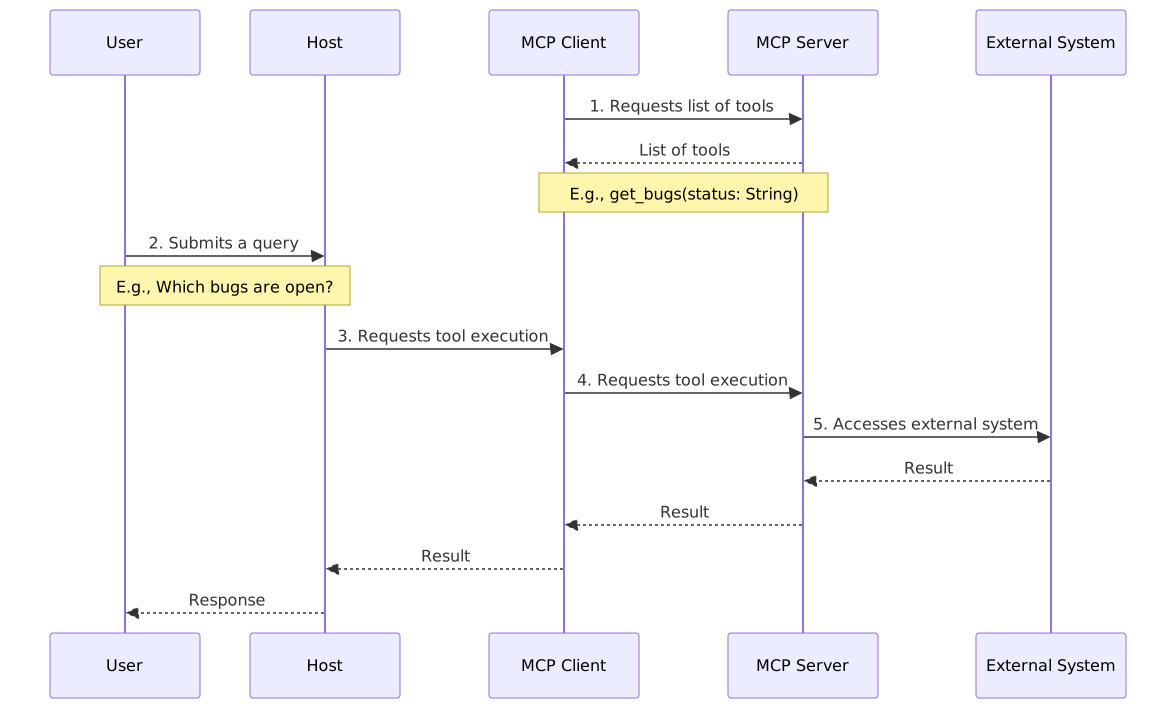
MCP follows a client-server architecture with four main components (also shown in the figure on the next page):
Host: MCP’s term for the AI application, which may be a chat interface, a coding agent, or any other language-model-based application.
MCP Client: connects the host to MCP servers, sends requests, receives responses, and informs the host about available tools and resources.
MCP Server: exposes the tools, resources, and prompts of an external system in a standardized format and handles requests from the MCP client.
External System: stores and provides the information required by the host.

The figure also highlights that an MCP client is reusable: it can connect to different MCP servers. The external system does not need to run on the same machine as the MCP server; it may run on another server or in a separate environment. Finally, communication between the MCP client and server takes place through the exchange of JSON messages.
The next figure illustrates the complete MCP interaction flow. First,
the MCP client queries the MCP server to discover the available tools,
such as a function named get_bugs(status: String). Next,
the user submits a natural-language request to the host (the AI
application): Which bugs are open?
The host passes the request to
the language model, which decides to invoke the appropriate tool. The
MCP client forwards this request to the MCP server, which accesses the
external system containing the requested data. Finally, the result
travels back through the MCP client to the host, where the model uses it
to generate a response for the user.
In addition to tools, MCP can provide access to external resources, such as files and database records.
Example: Jira, a widely used issue-tracking system, has an MCP server similar to the one described in our example. This server provides tools for searching issues, creating and updating tickets, querying sprints and boards, listing projects, reading comments, and more. As a result, users can submit requests such as the following to AI applications: (1) list the open high-priority bugs in the mobile project; (2) create a ticket to report a shopping-cart bug introduced by the latest app update; and (3) list the pending tasks in the current sprint and their assignees.
1.4.2 Integration Using Command-Line Interfaces 🔗
However, there is still no broad consensus on whether protocols such
as MCP are necessary. An alternative is to access external systems
through command-line interfaces (CLIs). These tools are
installed on the user’s machine and provide access to remote services. A
coding agent can invoke them just as it executes shell commands such as
ls, grep, find, and
curl, or Git commands such as git diff,
git commit, and git push.
Example: Fizzy is a Kanban-based project management tool developed by 37signals to help teams visually track tasks and workflows. Although it does not currently provide an MCP server, it offers a CLI that supports commands such as the following:
fizzy board list         # List Kanban boards
fizzy card list          # List cards on the default board
fizzy card show 42       # Show details of card 42
fizzy card create --board ID --title "..."   # Create a card
A coding agent can therefore integrate with Fizzy without an MCP server, simply by invoking these commands like any other local tool. This example illustrates how command-line interfaces can provide a simpler alternative to MCP for integrating AI applications with external systems.
1.5 Prompt Engineering 🔗
LLM experts such as Andrej Karpathy, quoted at the beginning of this chapter, have suggested that natural languages (such as English and Portuguese) can now also serve as programming languages. This is because they are used to write prompts that instruct language models to perform tasks.
Researchers have therefore studied and cataloged several prompting techniques, as described below:
Zero-Shot Prompting: Asking a model to perform a task without providing examples of the desired response.
One-Shot Prompting: Providing the model with a single example of the desired response. When multiple examples are provided, the technique is called Few-Shot Prompting.
Chain-of-Thought (CoT) Prompting: Encouraging the model to reason through intermediate steps before producing its final response. For example, a prompt might include instructions such as Think step by step or Explain your reasoning. Alternatively, it may explicitly specify the steps the model should follow. The goal is to encourage a structured reasoning process rather than an immediate answer.
As language models became more widely used, the term Prompt Engineering emerged to describe the techniques and best practices for designing effective prompts.
Language models have improved considerably in recent years, and more sophisticated architectures, such as those used by coding agents, have emerged. As a result, the need for elaborate prompts has diminished somewhat, as advanced models and architectures can now handle tasks that previously required more explicit instructions. However, this does not mean that prompts have become irrelevant. Clear, well-structured prompts remain important for obtaining accurate responses aligned with users’ goals.
We can distinguish three main categories of prompts for software engineering:
Code Modification Prompts, used to request changes to existing code, such as implementing a new feature, fixing a bug, refactoring code, or adopting a new programming language feature.
Code Comprehension Prompts, used to help developers understand existing code, including its behavior, structure, and dependencies.
Improvement Recommendation Prompts, used to identify potential improvements, such as refactoring opportunities, architectural changes, or new features.
The remainder of this section presents best practices for writing these types of prompts, along with several examples.
1.5.1 Code Modification Prompts 🔗
Two types of information are particularly important in code modification prompts. The first concerns the verification criteria for the requested task. For example, when requesting a bug fix, we can specify that all automated tests must continue to pass. The second concerns the context needed to perform the task. This may include error messages, relevant code elements, and links to external references, such as API documentation.
Here are some examples of code modification prompts:
Feature implementation prompt: Implement a function that applies a discount to the total of a shopping cart. For example, the coupon
15OFFshould apply a 15% discount. If the coupon is invalid, leave the total unchanged. Write tests for both valid and invalid coupons.Bug-fixing prompt: The shopping cart total is incorrect when the cart contains more than one item. For example, 2 × $10 + 1 × $5 should total $25, but the system displays $20. Investigate the calculation in
CartService.calculateTotal. First, write a test that reproduces the bug. Then, fix the bug and verify that the test passes.Refactoring prompt: Refactor the
calculateTotalmethod inShoppingCart, which is too long and has too many responsibilities. Extract separate methods for calculating the subtotal, discounts, and shipping costs. Ensure that all existing tests still pass.Programming language update prompt: Refactor
switchstatements intoswitchexpressions when eachcasecontains a single side-effect-free expression and theswitchis used to return or assign a value. Add adefaultbranch when necessary. Consider the refactoring complete only if all tests pass without modifying their assertions.
These prompts describe the required code modification in some detail and often include examples. Thus, using the earlier classification, they combine elements of One-Shot (or Few-Shot) and Chain-of-Thought prompting.
1.5.2 Prompts for Code Comprehension 🔗
These prompts typically describe open-ended tasks aimed at understanding a particular part of the code or a specific feature. They generally do not require explicit verification criteria or extensive contextual information. Here are some examples:
How does the login mechanism work?
Why does this code call
calculateDiscount()rather thangetDefaultDiscount()on line 1525?Explain why the
OrderServiceclass violates the Single Responsibility Principle.Explain the purpose of the following method. Before providing an answer, follow these steps: (1) Identify the method’s inputs;
- Identify its outputs; (3) Summarize its main logic; (4) Identify external dependencies, such as calls to other methods, APIs, or libraries. Finally, provide a concise explanation of the method’s purpose. [Method code follows]
Most of these code comprehension prompts are examples of Zero-Shot Prompting. However, they can also include explicit reasoning steps, as illustrated in the final example.
1.5.3 Prompts for Code Improvement 🔗
These prompts are used to identify opportunities for improving, modernizing, or evolving a software system. Consider the following examples:
Analyze the
UserService.javafile and identify refactoring opportunities to improve readability and maintainability.Analyze the legacy file
LegacyPaymentProcessor.phpand propose a step-by-step modernization strategy.Recommend refactorings to make the functions in
inventory_management.pyeasier to test.Suggest ways to improve the performance of
RecommendationEngine.ts.
These prompts are typically examples of Zero-Shot Prompting.
Bibliography 🔗
Anthropic. Best Practices for Claude Code. https://code.claude.com/docs/ en/best-practices
Michael Bolin. Unrolling the Codex agent loop. https://openai.com/index/ unrolling-the-codex-agent-loop
Shunyu Yao; Jeffrey Zhao; Dian Yu; Nan Du; Izhak Shafran; Karthik Narasimhan; Yuan Cao. ReAct: Synergizing Reasoning and Acting in Language Models. ICLR 2023.
Chip Huyen. AI Engineering: Building Applications with Foundation Models. O’Reilly, 2025.
Exercises 🔗
1. Compare coding assistants and coding agents, as discussed in this chapter. Explain the main difference between these two approaches to using AI in software development.
2. Coding agents often consume large numbers of tokens to complete a task (tokens are the basic units of text processed by language models and may represent words, parts of words, or symbols). Why is token consumption often so high? Base your answer on the architecture of coding agents presented in Section 10.3.
3. Research the meaning of the term context window in the context of LLMs. What are the context window sizes of some well-known LLMs? How does the context window affect the operation of coding agents? What mechanisms do coding agents use to mitigate this limitation?
4. A coding agent has been asked to implement a new feature in a system. Name three types of tools it could use to complete the task and briefly explain the purpose of each.
5. Explain the difference between Chain-of-Thought (CoT) Prompting and ReAct (Reasoning + Acting) in the context of language models.
6. Explain the difference between technical debt and cognitive debt.